Industries
Get direct access to our extensive portfolio of optical products and specialist technical expertise.

High-speed networking is no longer limited by switch capacity alone. Cable selection can shape latency, airflow, installation time, and long-term reliability. In data centers, a few extra meters of copper can add weight and reduce routing flexibility. An active optical cable offers a practical alternative for many of these connections.
An active optical cable combines optical fiber with integrated electrical-to-optical components. It can support high bandwidth across longer distances than many passive copper options. Fiber also resists electromagnetic interference near power supplies and dense server racks. That matters in crowded environments. Its smaller diameter may improve airflow and make cable management less demanding. Technicians can often route it through narrow pathways with less strain.
However, the choice is not automatic. An AOC needs compatible transceivers, sufficient power, and careful connector handling. Vendor specifications should be checked against switch ports, distance, temperature, and data rate requirements. Recognized testing practices can strengthen confidence, but field conditions still matter. Dust, tight bends, and repeated movement can cause problems. It is not magic.
This article examines why organizations choose active optical cable for high-speed networking. It compares bandwidth, reach, power use, durability, and installation demands. Real deployments may favor AOC in server-to-switch links and short backbone runs. Yet passive copper can remain practical for shorter, cost-sensitive connections. The strongest decision comes from measured requirements, not marketing language. Some assumptions may fail. That deserves honest review.
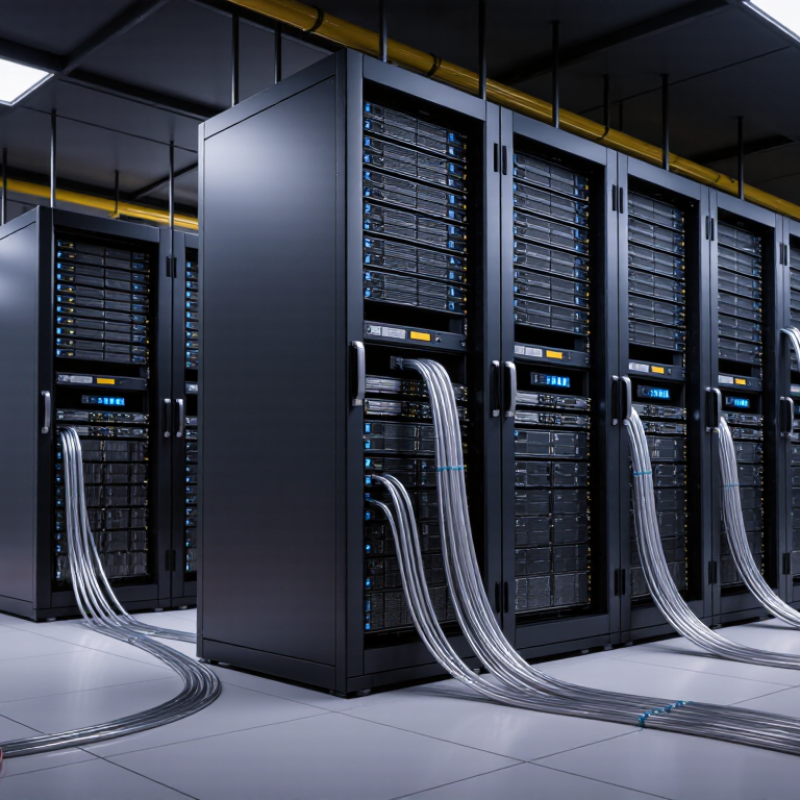
An active optical cable, or AOC, is a factory-terminated cable that combines optical fiber with electronic transceivers. It converts electrical signals into light, sends them through fiber, then converts them back at the receiving end. Unlike a passive copper cable, an AOC does not require separate optical modules at both ends. This integrated design reduces connector complexity and supports stable high-speed links across server racks.
In practical deployments, AOCs commonly support 10G, 25G, 40G, 100G, 200G, and 400G connections. Their thinner construction helps improve airflow around dense switch ports. Cisco’s Annual Internet Report projected global IP traffic would reach 396 exabytes per month by 2022. That growth explains why data centers need compact, higher-bandwidth cabling. IEEE 802.3 Ethernet standards define the link speeds, while industry interoperability specifications guide electrical and optical performance. Still, AOC is not automatically the best option. I have seen installation plans fail because cable length, bend radius, or port compatibility was checked too late.
Tips: Confirm the exact data rate, connector type, and supported distance before ordering. Keep each cable gently curved, not sharply folded. Label both ends. Shorter routes usually simplify airflow and maintenance. For links under several meters, passive copper may cost less. For longer rack-to-rack paths, AOC usually offers lower weight and better signal integrity. A useful review point is power: optical electronics consume energy, even when the cable appears simple. Check the manufacturer’s test report, operating temperature, and error-rate data before deployment.
Why Choose Active Optical Cable for High Speed Networking?
Active optical cables transmit high-speed data by converting electrical signals into light. A transmitter inside the connector uses a laser or VCSEL to create rapid light pulses. These pulses travel through optical fiber with low signal loss. At the opposite end, a photodetector converts the light back into electrical data for the network device.
In a dense data center rack, this process helps maintain signal quality across longer connections. Optical fiber also resists electromagnetic interference from power supplies and nearby cables. The result is cleaner transmission at high data rates, with less concern about electrical crosstalk. Latency remains very low because the conversion happens within tiny embedded modules. It is fast, but not magic.
Practical installation still matters. Keep the cable within its specified bend radius, and check connector compatibility before deployment. Active components also consume some power and may produce slight heat. One detail is easy to miss: a cable can support a high speed yet fail with equipment using an unsupported signaling standard. Testing the actual switch, server, and cable combination is more reliable than trusting a label alone. During troubleshooting, inspect link indicators, firmware settings, cable length, and airflow around the connectors. A small compatibility issue can look like a major network failure.
| Evaluation Dimension | Active Optical Cable (AOC) | Passive Copper Cable | Practical Networking Benefit |
|---|---|---|---|
| Data transmission medium | Optical fiber inside the cable; electrical-to-optical conversion is integrated into the connectors. | Electrical signals travel through copper conductors. | AOC combines a pre-terminated cable assembly with optical transmission in one installation-ready link. |
| How high-speed data is transmitted | The transmitter converts electrical data into modulated light. Optical signals travel through the fiber, and the receiver converts them back into electrical data. | Network equipment sends and receives data as electrical signals through the copper pair or conductor set. | The optical path supports high signaling rates while reducing electrical loss over longer in-rack or inter-rack connections. |
| Common supported speeds | Common product classes include 10, 25, 40, 50, 100, 200 and 400 Gb/s, depending on the connector, transceiver design and network standard. | Common passive copper options include 1, 10, 25 and selected 40 Gb/s applications, depending on cable category, length and interface. | AOC provides a practical path for high-bandwidth links where copper reach or cabling size becomes restrictive. |
| Typical reach | Often available from approximately 3 m to 100 m or more, depending on the data rate, fiber type and product design. | Typically shorter at higher data rates; many high-speed copper links are designed for several meters, with exact limits defined by the applicable standard. | Longer reach can simplify connections between adjacent racks and reduce the need for intermediate active equipment. |
| Cable weight | Generally lighter than an equivalent high-speed copper assembly, especially at longer lengths. | Usually heavier because copper conductors require more metal and shielding. | Lower cable weight can reduce tray loading and make large-scale installation easier. |
| Cable diameter and bendability | Typically slimmer and easier to route than high-speed copper assemblies, subject to the manufacturer’s minimum bend radius. | Often thicker and less flexible, particularly for high-category shielded cables. | Improves rack airflow and helps reduce congestion in dense cable-management systems. |
| Electromagnetic interference (EMI) | Fiber does not conduct electrical current and is inherently resistant to electromagnetic interference. | Copper can be affected by electromagnetic noise and may require appropriate shielding, grounding and separation. | AOC is useful in electrically noisy environments and near high-power equipment. |
| Power consumption | Requires power for the integrated optical electronics; actual consumption varies by speed, length and design. | Passive copper cable itself does not require optical conversion power, although network ports still consume operating power. | AOC may use more cable-end power than passive copper, but can reduce the need for signal-conditioning equipment on suitable links. |
| Latency | Very low latency; conversion electronics add only a small processing delay, which varies by implementation. | Very low latency because the cable is passive and does not perform optical conversion. | Both technologies can support latency-sensitive applications; device and network architecture usually have a greater effect than cable choice. |
| Installation and configuration | Factory-terminated and direction-specific in many designs; the transmitter and receiver ends must be connected correctly. | Generally simple to install, but performance depends on cable category, connector quality and channel length. | AOC offers a plug-and-play approach when the cable type and port compatibility have been verified. |
| Security and electrical isolation | The fiber section provides electrical isolation between the connected endpoints, although the connector electronics still require power. | Copper provides an electrically conductive path between endpoints. | Optical isolation can be advantageous for reducing ground-potential and electrical-noise concerns. |
| Reliability considerations | No field cleaning or polishing is normally required for a factory-terminated cable, but connectors must be protected from contamination and excessive bending. | Robust for short links, but performance can be affected by connector quality, crushing, excessive bending and electromagnetic conditions. | Correct handling, bend-radius compliance and port compatibility are essential for either technology. |
| Best-fit applications | High-density data centers, server-to-switch links, switch-to-switch connections, storage networks, high-performance computing and longer in-rack or inter-rack links. | Short equipment connections, low-cost deployments, power-sensitive links and installations where copper reach and density are sufficient. | AOC is most attractive when bandwidth, reach, low weight, compact routing and EMI immunity are priorities. |
Note: Actual speed, reach, power consumption and compatibility depend on the applicable networking standard, connector type, fiber design, cable length, port coding and equipment specifications. Always verify the cable’s electrical and optical compatibility before deployment.
Active optical cable delivers practical benefits where high-speed networking meets tight rack space and heavy traffic. It combines optical fiber with integrated transceivers, reducing signal loss across longer links. This supports stable data movement between servers, switches, and storage systems. Copper cables can become bulky at high speeds. AOC often stays lighter and easier to route.
The installation experience is usually straightforward. Pre-terminated connectors reduce field assembly and limit polarity mistakes. Optical transmission also resists electromagnetic interference from power supplies, motors, and dense server equipment. That matters in a crowded data center. Less cable weight can reduce pressure on patch panels and improve airflow around equipment. Lower heat near the cable path is another practical advantage, although the active ends still consume some power.
AOC is not a universal answer. Its fixed length can complicate future rack changes. The embedded electronics also create additional failure points. I would check distance, port compatibility, bend radius, and replacement access before deployment. Small details matter. In testing, label both ends clearly and leave gentle service loops. This makes troubleshooting faster when a link fails unexpectedly. For short, high-bandwidth connections, the balance of speed, weight, and installation simplicity can be compelling. Yet a flexible structured-fiber design may be better for frequently changing networks.
Active optical cables provide a practical balance between high bandwidth and extended reach. For typical 100 Gb/s data-center links, AOCs can support distances of up to about 100 meters while remaining lighter and more flexible than comparable copper assemblies. Values shown are representative industry ranges and may vary by cable design and deployment conditions.
Active optical cables combine optical fiber with fixed transceiver modules at both ends. Their design removes separate optical modules and reduces connection points. This can simplify installation in dense networking environments.
Several AOC types serve different link requirements. A single-channel cable suits short server-to-switch connections. Breakout AOCs split one high-bandwidth port into multiple lower-speed links. This is useful in leaf-spine architectures and storage clusters. Parallel-fiber AOCs carry multiple signals through separate fiber lanes. They support high-throughput links between switches, servers, and accelerator systems. Some specialized AOCs support video or USB connectivity, but networking remains their strongest use case.
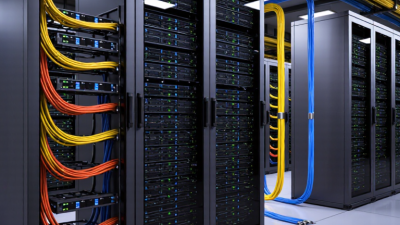
In a data center, AOCs can connect top-of-rack switches to servers across a cabinet row. Their thin cable bodies improve airflow around crowded ports. Optical transmission also avoids electromagnetic interference near power equipment. Before deployment, technicians should check port speed, lane configuration, polarity, cable length, and operating temperature. Testing bit-error performance is better than trusting labels alone. A small mismatch can leave a link unstable.
AOC is not perfect. Fixed ends limit flexibility during future upgrades. I have seen installations fail because teams ignored bend radius and cable routing. The practical choice depends on distance, port density, maintenance plans, and required bandwidth. Sometimes a modular optical link remains easier to repair. That trade-off deserves attention.
Choosing the right active optical cable begins with the network’s actual workload, not only its advertised speed. Confirm the required data rate, connector type, and transmission distance. A cable designed for short server links may not perform reliably across a longer rack row.
Check compatibility carefully. The cable must match the switch, server, transceiver port, and signaling standard. Some systems require programmed identification before they accept an optical connection. This detail is easy to miss. It can cause a healthy cable to appear defective.
I also recommend checking power consumption, especially in dense cabinets where many cables operate together.
Physical conditions matter too. Measure the route before ordering, and allow gentle bends near panels and cable trays. Avoid tight loops, crushing pressure, and repeated movement.
Optical cables resist electromagnetic interference, but their electronic ends still need suitable temperature and airflow. In practical installations, I inspect connector cleanliness and test each link after installation. A simple light source or network tester can reveal faults that visual checks cannot.
Specifications can mislead. Higher bandwidth is not always the best choice if the equipment cannot support it. I once overlooked cable length during a layout change; the link worked, but maintenance became awkward.
That experience changed my checklist. I now verify distance, compatibility, power, bend space, and testing requirements before purchase. A small planning error can become a costly cabinet problem.